Access Conditions for Workers
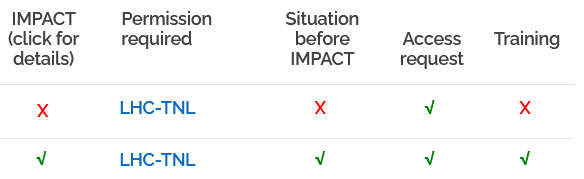
Are you having issues with an access to an accelerator? Please check the following list to find out what is missing (example is based on LHC-TNL).
- Did you make an access request: LHC-TNL?
- If yes, it is your supervisor signing the EDH document, not the signatory for the access.
- If no, please proceed with an access request in ADAMS.
- Do you have a dosimeter and valid RP traning? Check in ADAMS under Access to Accelerators that
- RP dosimetry situation is OK and
- RP dosimeter is OK.

- Have you completed all required trainings and ranks? Find out what are the required training ranks for the access. Check in ADAMS under Access to Accelerators that Training is ticked green next to the access that you want
- If yes, the Situation before IMPACT should be ticked.
- If no, check which training ranks you are missing.
- The training ranks for the access can be seen when you click on the permission required (here: LHC-TNL). You check these against the obtained training ranks in Training & permits to see what training you are missing.